
Formatting an SD card/Windows: Difference between revisions
From Hacks Guide Wiki
More actions
Geometomas (talk | contribs) m note not to restore SD contents on 64gb or larger if this is in the middle of another guide |
m added info about double checking if its fat32 Tags: Mobile edit Mobile web edit |
||
| Line 44: | Line 44: | ||
<li><translate><!--T:34--> Wait for the format to finish</translate></li> | <li><translate><!--T:34--> Wait for the format to finish</translate></li> | ||
<li><translate><!--T:35--> Click "Close"</translate></li> | <li><translate><!--T:35--> Click "Close"</translate></li> | ||
{{info|<translate nowrap> To confirm that your SD card was formatted correctly, navigate to This PC, right-click the SD card drive, and select Properties. Ensure that the file system is set to FAT32. </translate>}} | |||
<li><translate><!--T:36--> If the SD card had any files and folders on it before the format, copy everything back from your computer, unless you were linked to this by another guide that needs the SD to be formatted and blank</translate></li> | <li><translate><!--T:36--> If the SD card had any files and folders on it before the format, copy everything back from your computer, unless you were linked to this by another guide that needs the SD to be formatted and blank</translate></li> | ||
</ol> | </ol> | ||
| Line 82: | Line 83: | ||
<li><translate><!--T:18--> Click "OK"</translate></li> | <li><translate><!--T:18--> Click "OK"</translate></li> | ||
<li><translate><!--T:19--> Close SD Card Formatter</translate></li> | <li><translate><!--T:19--> Close SD Card Formatter</translate></li> | ||
{{info|<translate nowrap> To confirm that your SD card was formatted correctly, navigate to This PC, right-click the SD card drive, and select Properties. Ensure that the file system is set to FAT32. </translate>}} | |||
<li><translate><!--T:20--> If the SD card had any files and folders on it before the format, copy everything back from your computer, unless you were linked to this by another guide that needs the SD to be formatted and blank</translate></li> | <li><translate><!--T:20--> If the SD card had any files and folders on it before the format, copy everything back from your computer, unless you were linked to this by another guide that needs the SD to be formatted and blank</translate></li> | ||
</ol> | </ol> | ||
Revision as of 06:48, 19 April 2025
This is an add-on section for formatting an SD card to FAT32.
This page is for Windows users only. If you are not on Windows, check out the Linux or Mac pages.
Choose your SD card size
What You Need
- The latest version of SD Memory Card Formatter
- The latest version of guiformat
Instructions
- Insert your SD card into your computer
- If the SD card has any files and folders on it, copy everything to a folder on your computer
- Run
SD Card Formatter Setup(the.exefile) in the downloaded .zip file with Administrator privileges, then install the program - Run
SD Card Formatterfrom the Start Menu - Select your SD card’s drive letter for "Select card"

Make sure you choose the correct drive letter, otherwise you might accidentally erase the wrong drive! - Ensure that "Quick Format" is selected
- Click "Format"
- Click "OK"
- Wait for the format to finish
- Click "OK"
- Close SD Card Formatter
- Run
guiformat.exe - Select your SD card’s drive letter for "Drive"
Make sure you choose the correct drive letter, otherwise you might accidentally erase the wrong drive! - Select a size for "Allocation unit size"
- If the SD card is 64GB, choose 32768
- If the SD card is larger than 64GB, choose 65536 (note that if GUIFormat reverts to 32768, this does not mean it selected the wrong cluster size!)
- Ensure that "Quick Format" is selected
- Click "Start"
- Click "OK"
- Wait for the format to finish
- Click "Close"
- If the SD card had any files and folders on it before the format, copy everything back from your computer, unless you were linked to this by another guide that needs the SD to be formatted and blank
 |
You're not done yet! Your SD card will be formatted to exFAT at this point. The following steps will format it to FAT32. |
|
To confirm that your SD card was formatted correctly, navigate to This PC, right-click the SD card drive, and select Properties. Ensure that the file system is set to FAT32. |
Common errors with guiformat
Failed to open device: GetLastError()=32
Close everything that may be using the SD card, such as any File Explorer windows. If it does not resolve the issue, try formatting the card to NTFS, then run GUIFormat again.
GetLastError()=1117
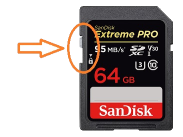
Your SD card write-protection switch may be enabled. The lock must be flipped upwards to allow writing to the SD card (including formatting).
What You Need
- The latest version of SD Memory Card Formatter
Instructions
- Insert your SD card into your computer
- If the SD card has any files and folders on it, copy everything to a folder on your computer
- Run
SD Card Formatter Setup(the.exefile) in the downloaded .zip file with Administrator privileges, then install the program - Run
SD Card Formatterfrom the Start Menu - Select your SD card’s drive letter for "Select card"
Make sure you choose the correct drive letter, otherwise you might accidentally erase the wrong drive! - Ensure that "Quick Format" is selected
- Click "Format"
- Click "OK"
- Wait for the format to finish
- Click "OK"
- Close SD Card Formatter
- If the SD card had any files and folders on it before the format, copy everything back from your computer, unless you were linked to this by another guide that needs the SD to be formatted and blank
|
To confirm that your SD card was formatted correctly, navigate to This PC, right-click the SD card drive, and select Properties. Ensure that the file system is set to FAT32. |
SD Card not formatting or has some other issue.
Refer to the SD Clean guide.