File Extensions on Windows: Difference between revisions
From Hacks Guide Wiki
More actions
{{shortcut|FILEXT|FILEEXT}} |
m wrap each list with <span> to prevent tabber from breaking lists |
||
| Line 9: | Line 9: | ||
|-|Windows 11= | |-|Windows 11= | ||
<span> | |||
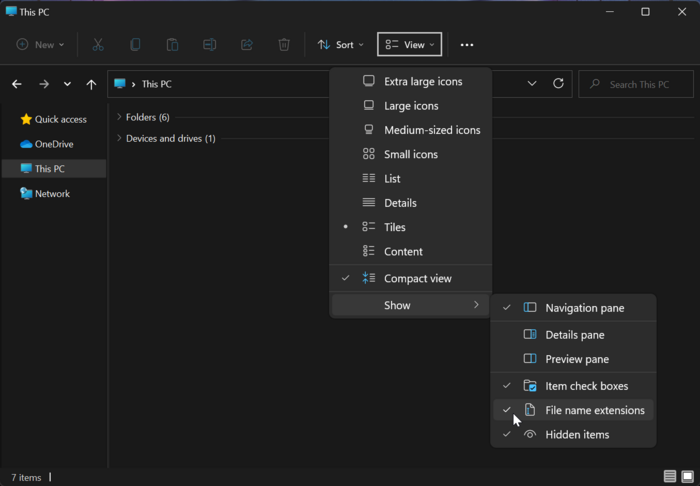
#Launch File Explorer by opening any directory, such as your SD card directory | #Launch File Explorer by opening any directory, such as your SD card directory | ||
#Click the "View" option in the toolbar | #Click the "View" option in the toolbar | ||
#Go to "Show" | #Go to "Show" | ||
#Click "File name extensions" to enable it<br>[[File:Windows-11-file-extensions.png|700px]] | #Click "File name extensions" to enable it<br>[[File:Windows-11-file-extensions.png|700px]] | ||
</span> | |||
|-|Windows 10 / 8.1 / 8= | |-|Windows 10 / 8.1 / 8= | ||
<span> | |||
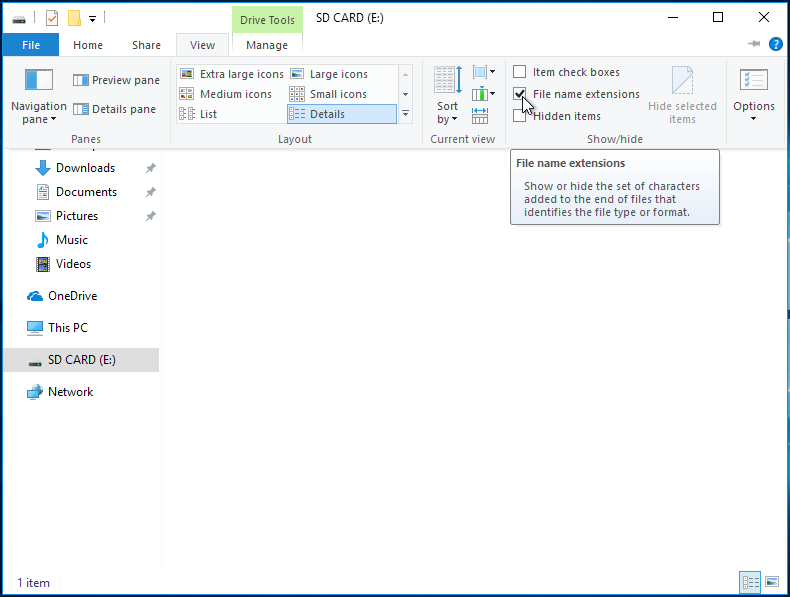
#Launch File Explorer by opening any directory, such as your SD card directory | #Launch File Explorer by opening any directory, such as your SD card directory | ||
#Click the "View" option on the ribbon menu | #Click the "View" option on the ribbon menu | ||
#Check the box labeled "File name extensions"<br>[[File:Windows-10-file-extensions.png]] | #Check the box labeled "File name extensions"<br>[[File:Windows-10-file-extensions.png]] | ||
</span> | |||
|-|Windows 7= | |-|Windows 7= | ||
<span> | |||
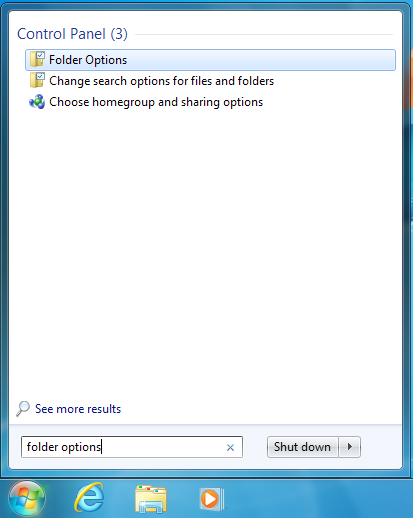
#Open the start menu by clicking on it or using the Windows key | #Open the start menu by clicking on it or using the Windows key | ||
#Search for "Folder Options" and select the corresponding result<br>[[File:Windows-7-folder-options-start-menu.png]] | #Search for "Folder Options" and select the corresponding result<br>[[File:Windows-7-folder-options-start-menu.png]] | ||
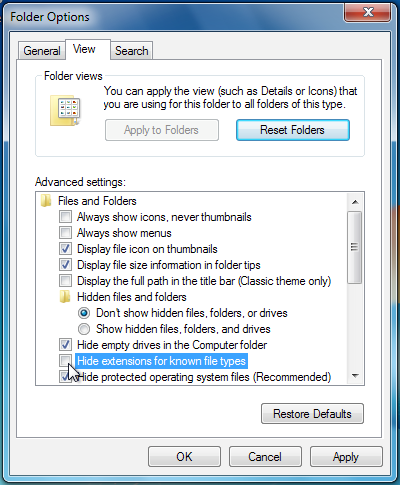
#Click the "View" option at the top of the Folder Options menu | #Click the "View" option at the top of the Folder Options menu | ||
#Uncheck the box labeled "Hide extensions for known file types"<br>[[File:Windows-7-folder-options.png]] | #Uncheck the box labeled "Hide extensions for known file types"<br>[[File:Windows-7-folder-options.png]] | ||
</span> | |||
</tabber> | </tabber> | ||
Revision as of 08:41, 2 August 2023
This is an add-on section for disabling Windows’s default behavior of hiding file extensions.
This will make it easier for you to find the referenced files in the rest of this guide.
Instructions
- Launch File Explorer by opening any directory, such as your SD card directory
- Click the "View" option in the toolbar
- Go to "Show"
- Click "File name extensions" to enable it

- Launch File Explorer by opening any directory, such as your SD card directory
- Click the "View" option on the ribbon menu
- Check the box labeled "File name extensions"

- Open the start menu by clicking on it or using the Windows key
- Search for "Folder Options" and select the corresponding result
- Click the "View" option at the top of the Folder Options menu
- Uncheck the box labeled "Hide extensions for known file types"