
Formatting an SD card/Windows/es: Difference between revisions
From Hacks Guide Wiki
More actions
| Line 69: | Line 69: | ||
<li>Presiona "OK"</li> | <li>Presiona "OK"</li> | ||
<li>Espera a que el formateo termine</li> | <li>Espera a que el formateo termine</li> | ||
<li> | <li>Presiona "OK"</li> | ||
<li> | <li>Cierra SD Card Formatter</li> | ||
{{info| To confirm that your SD card was formatted correctly, navigate to This PC, right-click the SD card drive, and select Properties. Ensure that the file system is set to FAT32. }} | {{info| To confirm that your SD card was formatted correctly, navigate to This PC, right-click the SD card drive, and select Properties. Ensure that the file system is set to FAT32. }} | ||
<li><span lang="en" dir="ltr" class="mw-content-ltr">If the SD card had any files and folders on it before the format, copy everything back from your computer, unless you were linked to this by another guide that needs the SD to be formatted and blank</span></li> | <li><span lang="en" dir="ltr" class="mw-content-ltr">If the SD card had any files and folders on it before the format, copy everything back from your computer, unless you were linked to this by another guide that needs the SD to be formatted and blank</span></li> | ||
Revision as of 04:01, 2 August 2025
Esta es una sección complementaria para formatear una tarjeta SD a FAT32.
Esta página es solo para usuarios de Windows. Si no estás en Windows, ve a las páginas de Linux o Mac.
Choose your SD card size
What You Need
- La versión más reciente de SD Memory Card Formatter
- La versión más reciente de guiformat
Instrucciones
- Inserta tu tarjeta SD en tu computadora
- Si la tarjeta SD tiene archivos y carpetas, copia todo a una carpeta en tu computadora
- Abre
SD Card Formatter Setup(el archivo.exe) en el archivo .zip que descargaste con privilegios de Administrador, e instala el programa - Abre
SD Card Formatterdesde el Menú Inicio - Selecciona la letra de unidad de tu tarjeta SD en "Seleccionar tarjeta"

Asegúrate de seleccionar la letra de unidad correcta, de lo contrario, podrías accidentalmente eliminar la unidad incorrecta! - Asegúrate que el "Formateo Rápido" este seleccionado
- Presiona "Formatear"
- Presiona "OK"
- Espera a que el formateo termine
- Presiona "OK"
- Cierra SD Card Formatter
- Abre
guiformat.exe - Selecciona la letra de unidad de tu tarjeta SD en "Unidad"
Asegúrate de seleccionar la letra de unidad correcta, de lo contrario, podrías accidentalmente eliminar la unidad incorrecta! - Selecciona un tamaño en "Tamaño de unidad de asignación"
- Si la tarjeta SD es de 64GB, selecciona 32768
- Si la tarjeta SD es de más de 64GB, selecciona 65536 (ten en cuenta que si GUIFormat lo revierte a 32768, no significa que seleccionaste el tamaño de asignación incorrecto!)
- Asegúrate que el "Formateo Rápido" este seleccionado
- Presiona "Empezar"
- Presiona "OK"
- Espera a que el formateo termine
- Presiona "Cerrar"
- Si la tarjeta SD tenía archivos o carpetas antes del formato, copia todo de nuevo desde tu computadora, a menos de que hayas sido redireccionado aquí desde otra guía que necesite que la tarjeta SD esté formateada y vacía.
 |
Todavía no estás listo! Tu tarjeta SD será formateada a exFAT en este punto. Los siguientes pasos la formatearan a FAT32. |
|
Para confirmar que tú tarjeta SD fue formateada correctamente, vé a Este Equipo, haz click derecho en la tarjeta SD, y selecciona Propiedades. Asegúrate de que el formato esté en FAT32. |
Errores comunes con guiformat
Failed to open device: GetLastError()=32
Cierra todo que pueda estar usando la tarjeta SD, como cualquier ventana del Explorador de Archivos. Si esto no resuelve el problema, intenta formatear la tarjeta a NTFS, y luego usa GUIFormat de nuevo.
GetLastError()=1117
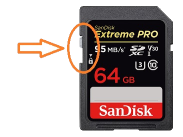
La protección contra escritura de tu tarjeta SD puede estar activada. La pestaña de bloqueo debe estar puesta hacia arriba para permitir la escritura a la tarjeta SD (incluyendo el formateo).
What You Need
- La versión más reciente de SD Memory Card Formatter
Instrucciones
- Inserta tu tarjeta SD en tu computadora
- Si la tarjeta SD tiene archivos y carpetas, copia todo a una carpeta en tu computadora
- Abre
SD Card Formatter Setup(el archivo.exe) en el archivo .zip que descargaste con privilegios de Administrador, e instala el programa - Abre
SD Card Formatterdesde el Menú Inicio - Selecciona la letra de unidad de tu tarjeta SD en "Seleccionar tarjeta"
Asegúrate de seleccionar la letra de unidad correcta, de lo contrario, podrías accidentalmente eliminar la unidad incorrecta! - Asegúrate que el "Formateo Rápido" este seleccionado
- Presiona "Formatear"
- Presiona "OK"
- Espera a que el formateo termine
- Presiona "OK"
- Cierra SD Card Formatter
- If the SD card had any files and folders on it before the format, copy everything back from your computer, unless you were linked to this by another guide that needs the SD to be formatted and blank
|
To confirm that your SD card was formatted correctly, navigate to This PC, right-click the SD card drive, and select Properties. Ensure that the file system is set to FAT32. |
SD Card not formatting or has some other issue.
Refer to the SD Clean guide.