
Formatting an SD card/Windows/fr: Difference between revisions
From Hacks Guide Wiki
More actions
Created page with "Insérez votre carte SD dans votre ordinateur" |
Created page with "=== Instructions ===" |
||
| Line 61: | Line 61: | ||
<ol> | <ol> | ||
<li>Insérez votre carte SD dans votre ordinateur</li> | <li>Insérez votre carte SD dans votre ordinateur</li> | ||
<li> | <li>Si la carte SD contient des fichiers et des dossiers, copiez-les tous vers un dossier sur votre ordinateur</li> | ||
<li> | <li>Lancez <code>SD Card Formatter Setup</code> (le fichier <code>.exe</code>) présent dans l'archive .zip téléchargée avec les droits Administrateur, puis installez le programme</li> | ||
<li> | <li>Lancez <code>SD Card Formatter</code> depuis le Menu Démarrer</li> | ||
<li> | <li>Sélectionnez la lettre de lecteur de votre carte SD dans le champ "Select card"{{warning|Make sure you choose the correct drive letter, otherwise you might accidentally erase the wrong drive!}}</li> | ||
<li><span lang="en" dir="ltr" class="mw-content-ltr">Ensure that "Quick Format" is selected</span></li> | <li><span lang="en" dir="ltr" class="mw-content-ltr">Ensure that "Quick Format" is selected</span></li> | ||
<li><span lang="en" dir="ltr" class="mw-content-ltr">Click "Format"</span></li> | <li><span lang="en" dir="ltr" class="mw-content-ltr">Click "Format"</span></li> | ||
Revision as of 19:51, 19 April 2026
Ceci est une section complémentaire sur comment formater une carte SD en FAT32.
Cette page est seulement pour les utilisateurs de Windows. Si vous n'utilisez pas Windows, jetez un œil aux pages Linux ou Mac.
Choose your SD card size
What You Need
- La dernière version de SD Memory Card Formatter
- La dernière version de guiformat
Instructions
- Insérez votre carte SD dans votre ordinateur
- Si la carte SD contient des fichiers et des dossiers, copiez-les tous vers un dossier sur votre ordinateur
- Lancez
SD Card Formatter Setup(le fichier.exe) présent dans l'archive .zip téléchargée avec les droits Administrateur, puis installez le programme - Lancez
SD Card Formatterdepuis le Menu Démarrer - Sélectionnez la lettre de lecteur de votre carte SD dans le champ "Select card"

Assurez-vous de choisir la bonne lettre de lecteur, sinon vous risquez d'effacer accidentellement le mauvais lecteur ! - Assurez-vous que "Quick Format" est sélectionné
- Cliquez sur "Format"
- Cliquez sur "OK"
- Attendez que le formatage se termine
- Cliquez sur "OK"
- Fermez SD Card Formatter
- Lancez
guiformat.exe - Sélectionnez la lettre de lecteur de votre carte SD dans le champ "Drive"
Assurez-vous de choisir la bonne lettre de lecteur, sinon vous risquez d'effacer accidentellement le mauvais lecteur ! - Sélectionnez une taille pour "Allocation unit size" (Taille d'unité d'allocation)
- Si la carte SD est de 64 Go, choisissez 32768
- Si la carte SD est d'une taille supérieure à 64 Go, choisissez 65536 (notez que si GUIFormat revient à 32768, cela ne signifie pas qu'il a sélectionné la mauvaise taille de cluster !)
- Assurez-vous que "Quick Format" est sélectionné
- Cliquez sur "Start"
- Cliquez sur "OK"
- Attendez que le formatage se termine
- Cliquez sur "Close"
- Si la carte SD contenait des fichiers et dossiers avant le formatage, copiez-les sur la carte SD depuis votre ordinateur, à moins que vous n'ayez été dirigés ici par un autre guide qui nécessite que la SD soit formatée et vide
 |
Ce n'est pas encore fini! Votre carte SD est dorénavant formatée en exFAT. Les étapes suivantes vont la formater en FAT32. |
|
Pour confirmer que votre carte SD a été correctement formatée, naviguez vers Ce PC, faites un clic-droit sur le lecteur de la carte SD, et sélectionnez Propriétés. Assurez-vous que le système de fichiers est défini sur FAT32. |
Erreurs courantes avec guiformat
Failed to open device: GetLastError()=32
Fermez tout ce qui peut être utilisé par la carte SD, par exemple, n'importe quelle fenêtre de l'Explorateur de fichiers. Si cela ne résout pas le problème, formatez la carte en NTFS, puis lancez GUIFormat à nouveau.
GetLastError()=1117
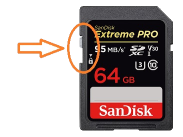
Your SD card write-protection switch may be enabled. The lock must be flipped upwards to allow writing to the SD card (including formatting).
What You Need
- La dernière version de SD Memory Card Formatter
Instructions
- Insérez votre carte SD dans votre ordinateur
- Si la carte SD contient des fichiers et des dossiers, copiez-les tous vers un dossier sur votre ordinateur
- Lancez
SD Card Formatter Setup(le fichier.exe) présent dans l'archive .zip téléchargée avec les droits Administrateur, puis installez le programme - Lancez
SD Card Formatterdepuis le Menu Démarrer - Sélectionnez la lettre de lecteur de votre carte SD dans le champ "Select card"
Make sure you choose the correct drive letter, otherwise you might accidentally erase the wrong drive! - Ensure that "Quick Format" is selected
- Click "Format"
- Click "OK"
- Wait for the format to finish
- Click "OK"
- Close SD Card Formatter
- If the SD card had any files and folders on it before the format, copy everything back from your computer, unless you were linked to this by another guide that needs the SD to be formatted and blank
|
To confirm that your SD card was formatted correctly, navigate to This PC, right-click the SD card drive, and select Properties. Ensure that the file system is set to FAT32. |
SD Card not formatting or has some other issue.
Refer to the SD Clean guide.