
3DS:Alternate Exploits/Installing boot9strap (MSET9-ChromeOS): Difference between revisions
More actions
m Whoops |
m ManiacOfHomebrew moved page 3DS:Installing boot9strap (MSET9-ChromeOS) to 3DS:Alternate Exploits/Installing boot9strap (MSET9-ChromeOS) Tags: Mobile edit Mobile web edit |
||
| (5 intermediate revisions by 2 users not shown) | |||
| Line 10: | Line 10: | ||
==Instructions== | ==Instructions== | ||
{{Info|text=On this page, you will use the MSET9-ChromeOS script, which is used to trigger MSET9. While the script is in progress, user data will temporarily disappear but will return upon the completion of this page. If you get an error when running the script, please join | {{Info|text=On this page, you will use the MSET9-ChromeOS script, which is used to trigger MSET9. While the script is in progress, user data will temporarily disappear but will return upon the completion of this page. If you get an error when running the script, please join {{ml|Get support|Nintendo Homebrew on Discord}} and ping <code>@_themaniac</code> for assistance.}} | ||
===Section I - Prep Work=== | ===Section I - Prep Work=== | ||
| Line 104: | Line 104: | ||
#Type the characters corresponding to your console model and version, then press Enter | #Type the characters corresponding to your console model and version, then press Enter | ||
#*The current state should display <code>Injected</code> | #*The current state should display <code>Injected</code> | ||
#*If you have already removed the trigger file (or never injected in the first place), the current state will show <code>Ready</code>, skip to Step | #*If you have already removed the trigger file (or never injected in the first place), the current state will show <code>Ready</code>, skip to Step 7 | ||
#Type <code>d</code>, then press Enter to remove the trigger file | #Type <code>d</code>, then press Enter to remove the trigger file | ||
#*You should see "Removed trigger file." | #*You should see "Removed trigger file." | ||
Latest revision as of 02:18, 4 February 2026
Required Reading
This is an alternative to the normal MSET9 Play Store guide that ChromeOS and Android devices would normally use. This version ports over the new features of MSET9 v2.0 and features a script that looks far more similar to the one used in the MSET9 CLI guide.
Compatibility Notes
 |
This script is only compatible with Chromebooks and other devices running ChromeOS. If you are on a Windows, Mac, or Linux device, you should follow the MSET9 CLI guide instead. If you are on an Android device, you should follow the MSET9 Play Store guide instead. If you do not have access to any of these devices, you will need to use an alternate exploit. |
What You Need
- The latest version of MSET9
Instructions
 |
On this page, you will use the MSET9-ChromeOS script, which is used to trigger MSET9. While the script is in progress, user data will temporarily disappear but will return upon the completion of this page. If you get an error when running the script, please join Nintendo Homebrew on Discord and ping @_themaniac for assistance. |
Section I - Prep Work
In this section, you will prepare the MSET9 exploit by temporarily creating a new HOME Menu profile with no user data, and then setting up that profile with only the minimum data required for MSET9 to trigger. Your existing user data will disappear, but will come back when you are finished with this page.
- Insert your SD card into your Chromebook
- Open the MSET9
.zipfile from your Downloads folder, and copy everything inside to the root of your SD card- Before copying, ensure that none of the files inside the ZIP are already on the SD card. If they are, delete them
- Go to this website and click "Copy!" to copy the script to your clipboard
- Open the ChromeOS Files application by pressing Alt+⇧ Shift+M on your keyboard
- Select your SD card on the sidebar on the left in the Files application
- Open the DevTools Console for the Files application by pressing Ctrl+⇧ Shift+J on your keyboard
- You may want to maximize this window to make it easier to read
- Do not close this window or the Files application until you are told to do so
- Click to the right of the right arrow on the left side of this menu. Your cursor should start blinking
- Press Ctrl+V to paste the code then push Enter to run the MSET9-ChromeOS script
- If you see a warning about not pasting code into the console that you do not understand, type
allow pastingand then push Enter. Then, retry this step - This script does not contain malware, sends no data to any server, and does not even require an internet connection. If you wish, you can read the code on the site where you copied it from to verify this
- If you see a warning about not pasting code into the console that you do not understand, type
- Type the characters corresponding to your console model and version, then press Enter
- Ensure that the correct console model and version is displayed
- Type
a, then press Enter to begin the process of creating the MSET9 ID1 - After reading the disclaimer, type
aagain and press Enter to accept it- If you see the message "Created hacked ID1.", you are ready to continue the guide
- Your 3DS will appear to have no data / no user-installed apps on HOME Menu. This is expected. Your data will come back at a later step
- Eject the SD card from the Chromebook, either by typing
ejectinto the DevTools Console or by selecting the eject icon in the Files app - Reinsert your SD card into the console
- Power on your console
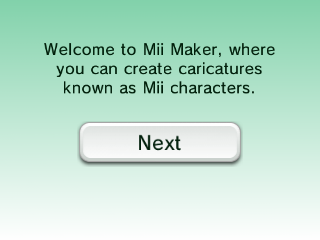
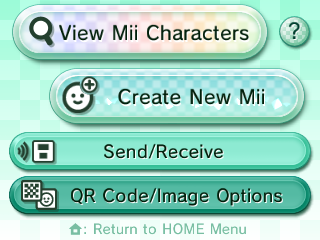
- Open Mii Maker
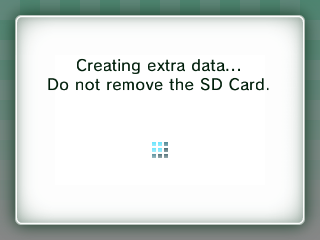
- Wait for your console to reach the Welcome to Mii Maker screen, then exit Mii Maker and return to the HOME Menu
- You may see this screen, which indicates the necessary data has been created
- If you just reach the normal Mii Maker screen, then the data already exists. Exit Mii Maker and return to the HOME Menu
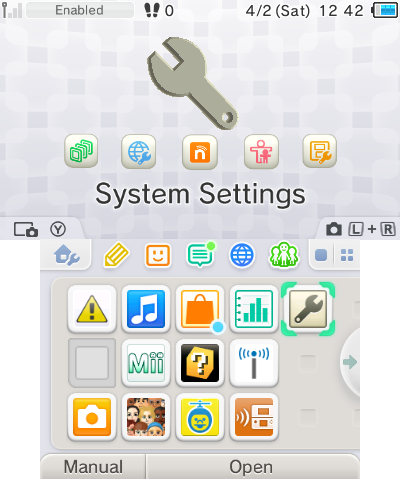
- Launch System Settings and navigate to
Data Management->Nintendo 3DS->Software->Reset(image)- This will not wipe any of your data
- Power off your console by pressing the power button then tapping Power Off on the lower screen
- Insert your SD card into your Chromebook
- Select your SD card on the sidebar on the left in the Files application
- In the DevTools Console window, type
restartand press Enter to run the MSET9-ChromeOS script- If you closed the Files window or the DevTools Console window, this will not work
- Instead, you should redo Section I Steps 3 through 8
- Type the characters corresponding to your console model and version, then press Enter
- The window should change to this and display
Ready- (Image coming soon)
- If the window says
Not ready - check MSET9 status for more details:- Type
b, then press Enter to check the MSET9 status and follow the directions indicated - Once you have resolved the issue, return to Section I Step 19
- Type
- The window should change to this and display
- Type
z, then press Enter to close the script- Do not close the window
- Eject the SD card from the Chromebook, either by typing
ejectinto the DevTools Console or by selecting the eject icon in the Files app - Reinsert your SD card into your console

Section II - MSET9
In this section, you will trigger MSET9 to launch SafeB9SInstaller (the custom firmware installer).
|
These instructions must be followed EXACTLY, so double-check EVERYTHING you are doing to avoid errors! |
- Power on your console, ensuring System Settings is selected
- If System Settings is not selected, hover over the System Settings icon using the D-Pad, power your console off, then back on
- Press A to launch System Settings
- Navigate to
Data Management->Nintendo 3DS->Extra Data(image) - Do not press any buttons or touch the screen
- With the console STILL ON, and without pressing any buttons or touching the screen, remove your SD card from your console
- The menu will refresh and say that no SD card is inserted
- Insert your SD card into your Chromebook
- Select your SD card on the sidebar on the left in the Files application
- In the DevTools Console window, type
restartand press Enter to run the MSET9-ChromeOS script- If you closed the Files window or the DevTools Console window, this will not work
- Instead, you should redo Section I Steps 3 through 8
- Type the characters corresponding to your console model and version, then press Enter
- In the DevTools Console window, type
c, then press Enter to inject MSET9- You should see "MSET9 successfully injected!"
- Eject the SD card from the Chromebook, either by typing
ejectinto the DevTools Console or by selecting the eject icon in the Files app - Reinsert your SD card into your console without pressing any buttons or touching the screen
- If the exploit was successful, you will have booted into SafeB9SInstaller

Section III - Installing boot9strap
In this section, you will install custom firmware onto your console.
- When prompted, input the key combo given on the top screen to install boot9strap
- If a step on the lower screen has red-colored text, and you are not prompted to input a key combo, follow this troubleshooting guide
- Once it is complete, press A to reboot your console
- Your device should have rebooted into the Luma3DS configuration menu
- Luma3DS configuration menu are settings for the Luma3DS custom firmware. Many of these settings may be useful for customization or debugging
- For the purpose of this guide, these settings will be left on default settings
- If your device shuts down when you try to power it on, ensure that you have copied
boot.firmfrom the MSET9.zipto the root of your SD card
- Press (Start) to save and reboot
Section IV - Removing MSET9
In this section, you will remove MSET9 to prevent further issues and to restore your user data (games, themes, etc). (This will not remove the custom firmware that you have just installed.)
|
Do NOT skip this section! If you skip it, applications may crash unexpectedly and you will encounter errors on the next page! |
- Power off your console
- Insert your SD card into your Chromebook
- Select your SD card on the sidebar on the left in the Files application
- In the DevTools Console window, type
restartand press Enter to run the MSET9-ChromeOS script- If you closed the Files window or the DevTools Console window, this will not work
- Instead, you should redo Section I Steps 3 through 8
- Type the characters corresponding to your console model and version, then press Enter
- The current state should display
Injected - If you have already removed the trigger file (or never injected in the first place), the current state will show
Ready, skip to Step 7
- The current state should display
- Type
d, then press Enter to remove the trigger file- You should see "Removed trigger file."
- Type
e, then press Enter to remove MSET9- You should see "Successfully removed MSET9!"
|
You can now close the DevTools Console window and the Files application. |
At this point, your console will boot to Luma3DS by default.
- Luma3DS does not look any different from the normal HOME Menu. If your console has booted into the HOME Menu, it is running custom firmware.
- On the next page, you will install useful homebrew applications to complete your setup.
|
Did you follow Section IV (Removing MSET9)? That section is MANDATORY! |
Continue to Finalizing Setup